
Why I built it
I reach my MacBook from other rooms with Moonlight, often at night. Every time I disconnect, its screen comes back on, bright, in a dark room where my girlfriend is asleep. Turning the brightness to zero leaves the backlight on, and closing the lid puts the Mac to sleep or drops the display the stream is capturing. I wanted the panel physically off, with the display still there for the next stream.
I'd also like to use the MacBook like a headless Mac mini for AI-driven development: lid shut, plugged in, running agents I check on remotely. That part doesn't work reliably yet; see below.
What it does today
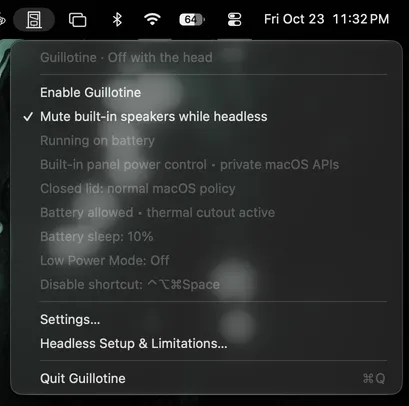
- Cuts the screen and keyboard: one menu bar switch asks macOS to power off the built-in panel and turns off the keyboard backlight, and macOS keeps the logical display, so remote access keeps working. It never fakes this with brightness zero.
- Comes back on cue: a global shortcut (Control–Option–Command–Space), the menu, or quitting restores both. Unplugging restores them too, unless you allow battery use. If the panel stays dark after a stream ends, the shortcut also asks it to power on.
- Leaves sleep alone: with closed-lid support off, the Mac sleeps on your usual policy, and locking and your password settings work as before. Pair it with Caffeine if you want to prevent idle sleep. Restoring on wake is optional and off by default.
- Looks after the battery: sleep at a battery percentage (10% by default, any value from 1 to 100, or off), an optional Low Power Mode on battery, and sleep when macOS reports serious heat on battery. Before it sleeps, it turns the screen and keyboard back on.
- Mutes the built-in speakers while headless, if you ask. Other outputs, and the audio in a remote stream, aren't touched.
How it's built
- Fails safe. A small signed guard process makes the changes and holds them on a five-second lease from the app. If the app crashes or is killed, the lease runs out and the screen comes back. A journal on disk recovers state if the guard itself is killed.
- Least privilege. Lid-open use needs no admin rights. The optional helper runs as root but only takes fixed requests from Guillotine's own signed guard, and it can't be handed commands, paths, or setting names. It changes one power setting and puts it back.
- Offline. No networking code, no account, and no telemetry.
- Strict by default. Every warning is an error, and releases are signed with a Developer ID and notarized by Apple.
What it can't do
- Reliably stream with the lid closed. The closed-lid option is experimental. In my testing, closed-lid streaming has failed, including a WindowServer restart when I reopened the lid. I haven't found the cause, so don't rely on it for unattended access.
- Hold the panel off against macOS. It asks for power-off once per activation. Opening the lid, waking, or another display change can light the panel again, and Guillotine doesn't fight that. Restore and enable again to turn it back off.
- Sleep while closed-lid mode is on. The helper turns off system sleep for the whole Mac, manual sleep included, until you restore. Locking still works.
- Promise it survives macOS updates. Panel and keyboard power go through private Apple APIs, so a macOS update can break them. I've tested a MacBook Pro (M1 Pro) on macOS 27.0.1.
- Run on every Mac. It needs an Apple Silicon MacBook. Intel Macs, desktops, and external displays aren't supported.
Try it
brew install --cask benjweaver/guillotine/guillotineOr download the zip from Releases. It's signed and notarized, so macOS opens it without a warning. It's free software under the GPL.